7 – Collecting Photos From Other People
Collecting Photos From Other People
Since your Activity photos will make up the majority of your yearbook
page content, you’ll want to gather as many different photos as you can. The
place you don’t want to gather them is in your email inbox.
Photo Share
Photo Share is a private photo submission tool that allows parents to
upload images for you to use on your yearbook. You can turn on and turn off collection
dates, limit uploads to the people you allow, and requires them to tag or label
their images. You won’t have to worry about image compression through email and
your inbox won’t be overflowing. This solution works great if you want your images
to be private. If not, try using the ReplayIt feature, located in the next section.
- Create An Image Share Site
- Working With Other Image taking tools
- Converting Your Publisher, Photoshop, or other files to High Res JPGs
- Pixels to Inches Conversions
- Copyright Law
- Parent Tribute Pages
Accepted Photo Formats
Our system only accepts photos saved as
JPG/JPEG, PNG, TIFF, or HEIC. Large photos over 10,000
pixels will have to be reduced before you upload. When uploading multiple
large images, try uploading a few at a time. Uploading too many large images
runs a chance of slowing down or timing out.
-
There is some free photo editing software you can use to help lower the file
size. -
Be careful of screenshot images
- These images are sometimes low resolution and low image size
-
The system is designed to stop images from being stretched past their
intended size.- This will stop images from becoming blurry
- This will stop images from becoming distorted
.HEIC Images
If for any reason you happen to experience any issues with uploading
HEIC photos, see below for how to convert these images to another format.
Tips on .HEIC Photos
-
There are some sites that will convert images for free.
-
Please note – some of these sites might only let you convert a few
at a time. - Converting HEIC to JPG
-
Please note – some of these sites might only let you convert a few
PDFs
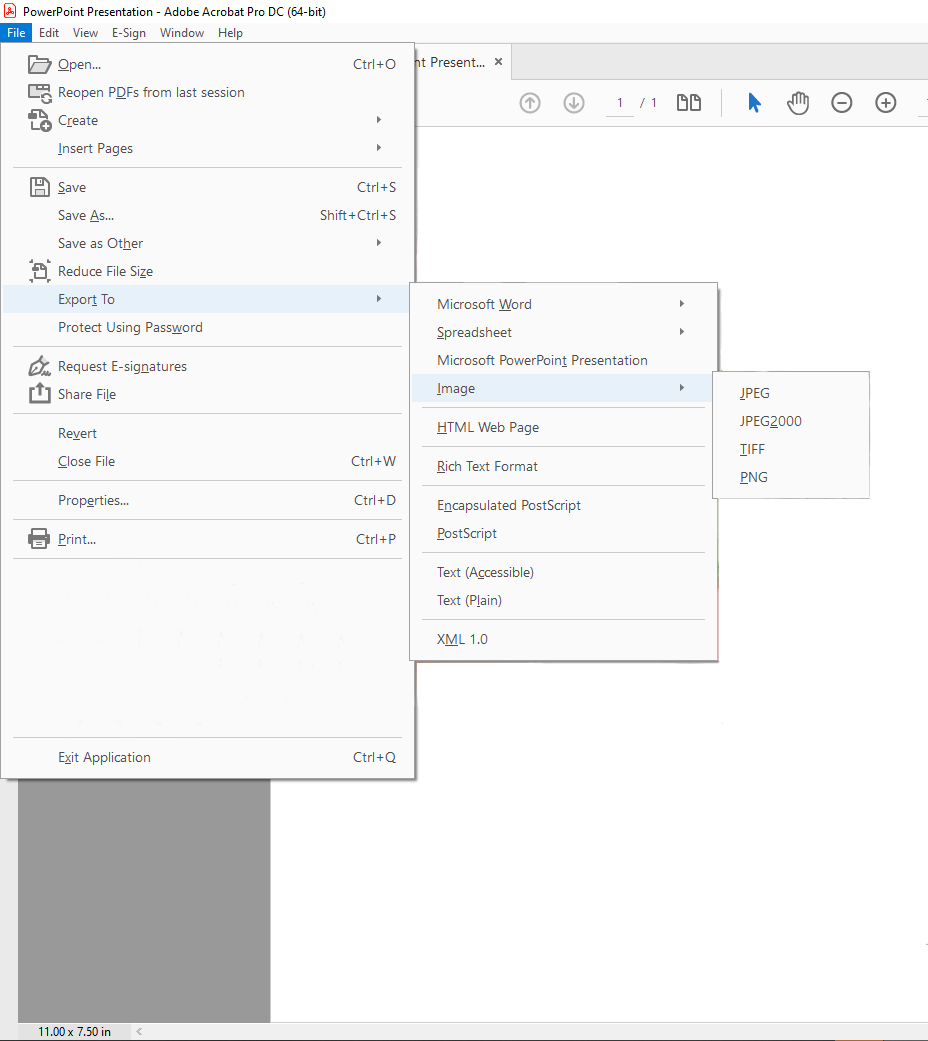
You cannot upload PDFs as images. These will have to be converted.
You can go to Adobe’s website and use their PDF to JPG converter.
Adobe Acrobat DC
If you have Acrobat DC you can convert a PDF to a JPG, PNG, or TIFF.
- File > Export To > Image > (JPEG, TIFF, or PNG)